- Updated
Tattoo Animation video prompt
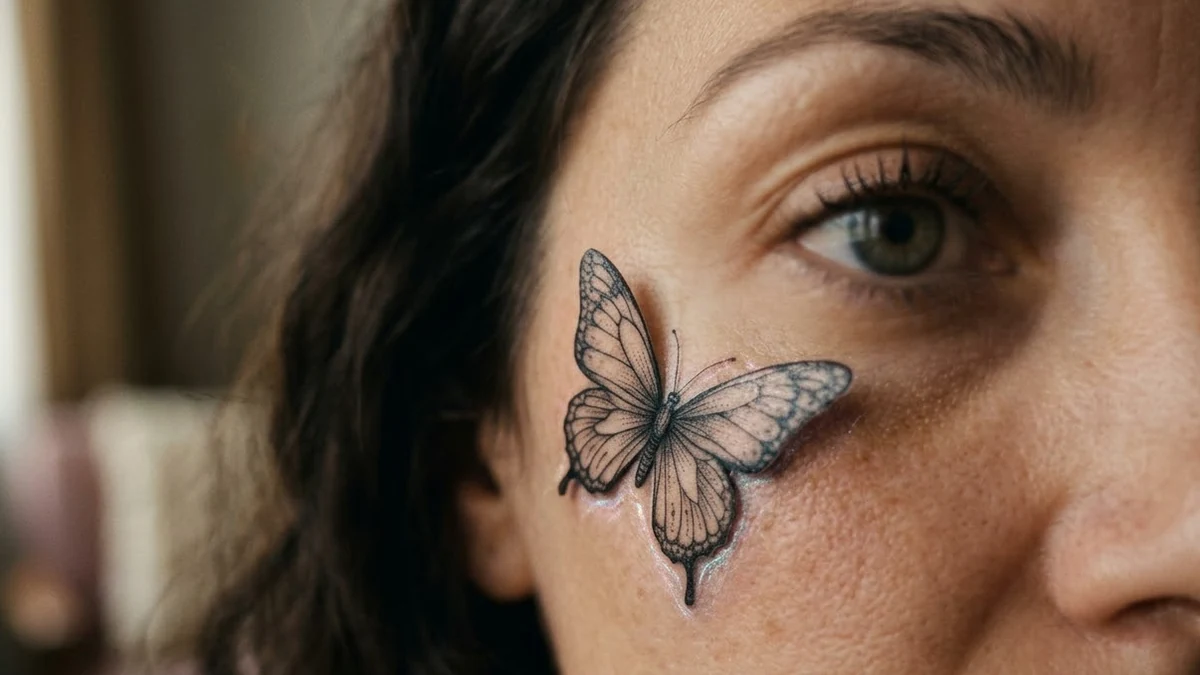
In Tattoo Animation, a small butterfly flies in, lands on the cheek and turns into a tattoo. It is a gentle, artistic effect for portraits. The prompt asks for a slow blink and a soft shimmer so the change feels smooth.
Tattoo animation, 9:16, 5 seconds. Close portrait from this photo. A small [BUTTERFLY STYLE, e.g. black ink] butterfly with delicate detail flutters into the frame, lands on the person's cheek and becomes a tattoo that settles into the skin, with a soft shimmer. The person blinks slowly and smiles. Soft natural light, shallow depth of field. Face and hairstyle stay the same. No text.
Some “open” links are affiliate links: if you sign up through them we may earn a commission, at no extra cost to you.
Use a close-up with clear skin on the cheek. Keep the tattoo small and simple so it looks real.
Get a better result
A five-second close-up where a small, finely detailed butterfly flutters into frame, lands on your cheek and settles into the skin as a tattoo with a soft shimmer, while you blink slowly and smile in soft light.
The butterfly looks like a sticker.
Fix: Ask for “ink that sits in the skin, fine lines, slight skin texture over it”, and keep it small.
- The tattoo is too big or too dark. Say “thumbnail-sized, delicate, single colour”, as the tip suggests.
- Your face changes when the butterfly lands. Repeat that the face and hairstyle stay the same, and use a close-up with clear skin.
Replace the tattoo with a henna-style pattern drawing itself on the back of the hand, with soft natural light.
Keep the butterfly. Slow the landing and let it keep one gentle wing flutter before it settles.
Guides that use this prompt
More video generation prompts
See all 489 →
More like this
- Tattoo design ideaMidjourney · ChatGPT · Gemini
- Preview a tattoo placementGemini · ChatGPT
- Photo to anime-style animationKling · Veo · Seedance
- Butterfly emerging from a chrysalisVeo · Kling · Seedance
- Eyes In video promptHiggsfield · Kling · Veo